
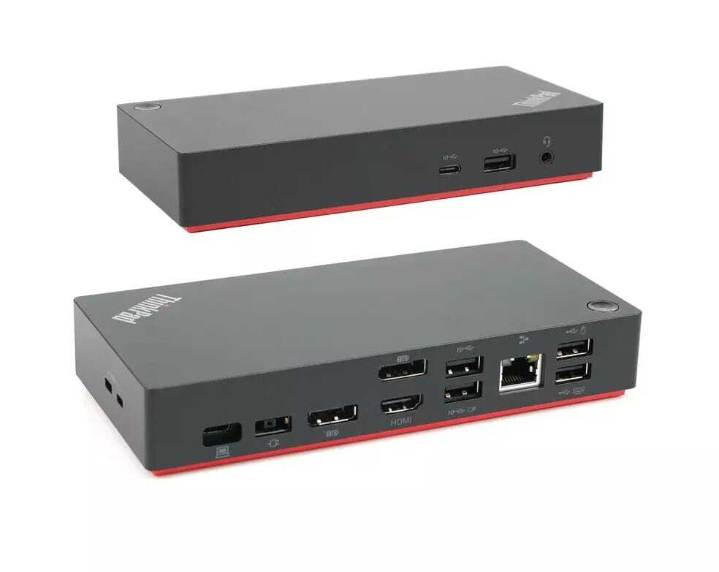

An HP laptop docking station is one of the most valuable accessories for professionals, students, and businesses looking to create an efficient and clutter-free workspace. As laptops become thinner and more portable, they often include fewer connectivity ports. A docking station solves this challenge by allowing users to connect multiple monitors, keyboards, mice, printers, external storage devices, Ethernet connections, and other peripherals through a single connection.
Whether you’re working from home, managing a business office, or setting up a professional workstation, an HP laptop docking station improves productivity while making your workspace cleaner and more organized. Investing in the right docking station can significantly enhance your daily workflow and make switching between office and mobile work effortless.
Why Choose an HP Laptop Docking Station?
Modern work environments require flexibility and efficiency. A docking station allows users to transform their laptop into a complete desktop workstation within seconds.
Some of the biggest advantages include:
- One-cable connectivity
- Multiple monitor support
- Faster data transfer
- Stable wired internet connection
- USB expansion
- Charging capability
- Cleaner desk setup
Instead of connecting multiple cables every day, you simply connect your laptop to the dock and instantly access all your devices.
HP Docking Station: Designed for Productivity
An HP docking station is engineered to support business users who rely on multiple devices throughout the workday.
Expand Your Connectivity
Many HP docking stations include:
- USB-A ports
- USB-C ports
- HDMI outputs
- DisplayPort outputs
- Ethernet connection
- Audio ports
- Power delivery
This allows users to connect all essential office equipment while maintaining a tidy workspace.
Perfect for Hybrid Work
Hybrid work environments require quick transitions between office and home.
With an HP docking station, you can:
- Connect instantly to your workstation
- Charge your laptop while working
- Access all peripherals through one cable
- Reduce desk clutter
- Improve workflow efficiency
The convenience of one-touch connectivity makes docking stations an excellent investment.
Dell Docking Station for Laptop: Cross-Brand Compatibility
Many professionals also search for a Dell docking station for laptop because docking stations often support multiple laptop brands through universal USB-C or Thunderbolt connections.
Benefits include:
- Multi-brand compatibility
- Flexible workstation setup
- Easy device switching
- Reliable business performance
Whether using HP, Dell, Lenovo, or compatible USB-C laptops, universal docking stations provide excellent flexibility for mixed-device workplaces.
Dell Thunderbolt Dock: High-Speed Performance
A Dell Thunderbolt dock offers exceptional performance for professionals who require high-speed data transfer and multiple display support.
Advantages of Thunderbolt Technology
Thunderbolt docks provide:
- Ultra-fast data transfer
- Support for multiple 4K displays
- High-speed external storage
- Stable network connections
- Fast laptop charging
These features make Thunderbolt docks popular among designers, engineers, developers, and creative professionals.
Ideal Professional Applications
Thunderbolt docking stations are commonly used for:
- Video editing
- Graphic design
- Programming
- Financial trading
- Engineering software
- Content creation
High-performance connectivity ensures smoother multitasking throughout the workday.
HP Thunderbolt Dock: Premium Business Connectivity
An HP Thunderbolt dock combines high-speed connectivity with enterprise-level reliability.
Enhanced Display Support
HP Thunderbolt docks can often support:
- Dual monitor setups
- Triple monitor configurations
- High-resolution displays
- Smooth video performance
This significantly improves productivity for professionals working with multiple applications simultaneously.
Fast Charging
Many HP Thunderbolt docks also provide laptop charging while connected, reducing cable management and eliminating the need for separate chargers.
Targus Docking Station Australia: A Reliable Universal Option
Professionals looking for universal compatibility often consider a Targus docking station Australia for their workstation setup.
Targus docking stations are known for:
- Wide laptop compatibility
- Business-grade reliability
- Multiple USB ports
- Display support
- Compact designs
- Easy installation
Universal docks provide excellent flexibility for businesses with mixed laptop brands.
Benefits of Using a Docking Station
A quality docking station delivers numerous advantages beyond additional ports.
Increased Productivity
Docking stations allow you to:
- Work across multiple monitors
- Connect external storage
- Use full-size keyboards and mice
- Access wired internet
- Reduce setup time
These improvements help users work faster and more comfortably.
Cleaner Workspace
Instead of multiple cables connected directly to your laptop, a docking station organizes all devices through one central hub.
Benefits include:
- Better cable management
- Less desk clutter
- Easier workstation organization
- Professional appearance
An organized workspace often contributes to greater focus and efficiency.
Choosing the Right Docking Station
Before purchasing a docking station, consider your daily workflow.
Important factors include:
Connectivity Requirements
Think about how many devices you connect regularly.
You may need:
- Multiple USB ports
- HDMI outputs
- DisplayPort connections
- Ethernet
- SD card reader
- Audio ports
Selecting a dock with sufficient connectivity ensures future flexibility.
Display Support
Professionals using multiple screens should verify:
- Number of supported monitors
- Maximum display resolution
- Refresh rate compatibility
Proper display support improves multitasking and workflow efficiency.
Laptop Compatibility
Always confirm compatibility with:
- USB-C laptops
- Thunderbolt-enabled devices
- Operating system requirements
- Charging capabilities
Choosing the correct dock prevents future connectivity issues.
Docking Stations for Home Offices
Home offices have become increasingly common.
A docking station helps create a professional workspace by connecting:
- External monitors
- Webcams
- Printers
- Speakers
- Ethernet
- External drives
The result is a workspace that rivals traditional office environments.
Business Benefits
Businesses benefit from docking stations because they:
- Simplify workstation setup
- Reduce cable wear
- Improve employee productivity
- Support hybrid work
- Standardize office equipment
IT departments also appreciate easier hardware management across multiple employees.
Why Buy Refurbished Docking Stations?
Professionally refurbished docking stations provide excellent value while maintaining reliable performance.
Advantages include:
- Lower purchase cost
- Thorough testing
- Business-grade quality
- Environmentally friendly purchasing
- Excellent reliability
Refurbished equipment allows businesses and individuals to build high-quality workstations within budget.
Maintaining Your Docking Station
To maximize lifespan:
- Keep ports clean.
- Avoid excessive cable strain.
- Update firmware when available.
- Disconnect devices properly.
- Store in a dry environment.
Simple maintenance ensures long-term performance.
An HP laptop docking station is an essential accessory for anyone looking to improve productivity, simplify connectivity, and build a professional workstation. Whether you’re considering a Dell docking station for laptop, a high-performance Dell Thunderbolt dock, a versatile HP docking station, a reliable Targus docking station Australia, or an advanced HP Thunderbolt dock, choosing the right docking solution can dramatically enhance your daily workflow and workspace efficiency.
At Tech Trade Group, we provide high-quality refurbished laptops, desktops, docking stations, and complete workstation solutions designed for Australian homes and businesses. Every product is carefully tested, cleaned, and certified to ensure dependable performance and long-lasting reliability. Whether you’re upgrading your home office or outfitting an entire workplace, Tech Trade Group offers affordable technology, expert advice, and fast Australia-wide delivery to help you build the perfect workspace.


